A Python receiver for the heart rate a Bluetooth LE watch broadcasts. I used it with a Garmin Fenix 7 and a Garmin Instinct 2, both with heart rate broadcast switched on. It hands the reading on in three ways: printed to the terminal, written to a file that OBS can read for a live overlay on video, or pushed over a websocket to a web page.
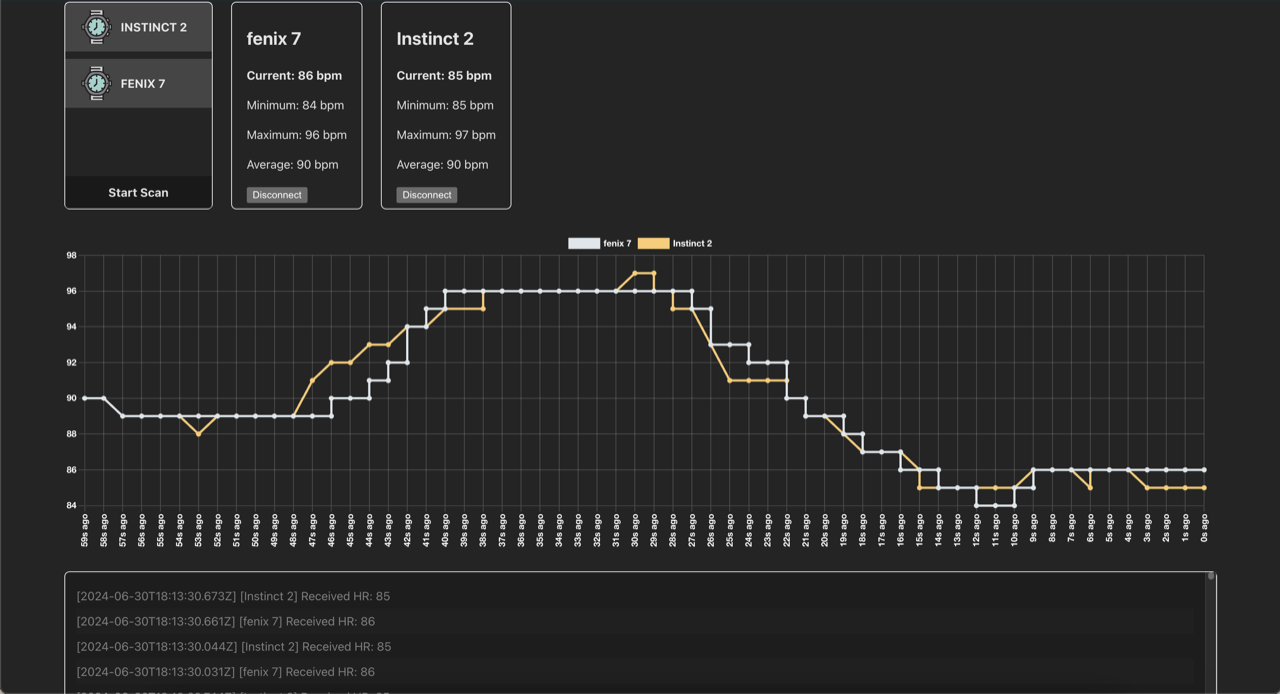
The screenshot above is both watches worn at the same time on 30th June 2024. Since connecting, the Fenix 7 had read 84 to 96 bpm and the Instinct 2 85 to 97, and both averaged 90.
What does it print?
One line per reading. This is monitor against one of the watches, from the repo’s screenshot:
$ python src/cli.py monitor -d 0332D79A-1D08-60A0-1EB5-318736195103
[06/30/2024 19:17:52] client.INFO  - Connecting to device: 0332D79A-1D08-60A0-1EB5-318736195103
[06/30/2024 19:17:55] client.INFO  - Connected to device: 0332D79A-1D08-60A0-1EB5-318736195103
[2024-06-30T18:17:55Z] ❤️ 95
[2024-06-30T18:17:56Z] ❤️ 95
[2024-06-30T18:17:56Z] ❤️ 95
[2024-06-30T18:17:57Z] ❤️ 95
The watches send a reading roughly every 0.6 seconds. A reading where the strap or watch reports no skin contact comes through as - rather than a number.
How do I run it?
Put the watch into heart rate broadcast mode, then scan for it and monitor its address:
python -m venv .venv && source .venv/bin/activate
pip install -r requirements.txt websockets

python src/cli.py scan                         # name and address of each heart rate device nearby
python src/cli.py monitor -d <DEVICE_ADDR>     # print readings
python src/cli.py monitor -d <DEVICE_ADDR> -o file   # write them to var/hr.txt
python src/cli.py describe -d <DEVICE_ADDR>    # list the device's services and characteristics
It needs Python 3.12 or later. websockets is on that line because the websocket server imports it and requirements.txt does not list it.
For the dashboard, start python src/websocket.py (-H and -P set the host and port, default 0.0.0.0:8765), then npm ci && npm run dev in examples/website.
How does it read the heart rate?
Through Bleak, using the standard Bluetooth Heart Rate service rather than anything Garmin specific. scan keeps only devices advertising that service. monitor subscribes to the Heart Rate Measurement characteristic and reads two bytes from each notification: a flags byte and the heart rate. The flags are decoded as the Heart Rate Service spec lays them out, and the sensor contact bits decide whether a reading is real.
The websocket server takes three plain text commands: scan, connect:<address> and disconnect:<address>. It answers with JSON, {"action": "devices", ...} for a scan and {"action": "hr", "hr": "86", ...} for each reading. The Vue example connects to ws://127.0.0.1:8765, scans on connect, follows several devices at once, graphs each device’s last 120 readings with Chart.js, shows minimum, maximum and average since connecting, and reconnects three seconds after the socket drops.
What is still rough?
- It only reads two-byte notifications. The spec also allows a 16-bit heart rate, energy expended and RR intervals in the same packet, and a sensor that sends any of those fails the unpack. The Garmin watches never did.
- As written it is macOS only.
requirements.txtpins pyobjc’s CoreBluetooth bindings, and the websocket server splitsconnect:<address>on colons, which breaks on the MAC addresses Linux and Windows report. macOS hands out UUIDs like the one above instead. - The file output truncates
var/hr.txtwhen it starts and then appends every reading, so whatever reads it has to take the last line. The path is relative, so run it from the repository root. - The websocket server has no authentication and listens on every interface by default. Anyone who can reach the port can scan and connect. Keep it on localhost.
History
- 29th to 30th May 2023: first version, a watch script and a graph script, with the flag parsing and a heart rate device filter on the scan.
- 30th June 2024: rework into a library with the CLI, the websocket server and the Vue example.
- Since then: Dependabot and Snyk bumps to the example’s dependencies, and an MIT licence on 15th July 2026.